Everest VW
Online shop · Kettering, United Kingdom · everest-vw.co.uk
Unclaimed · Not verified by owner

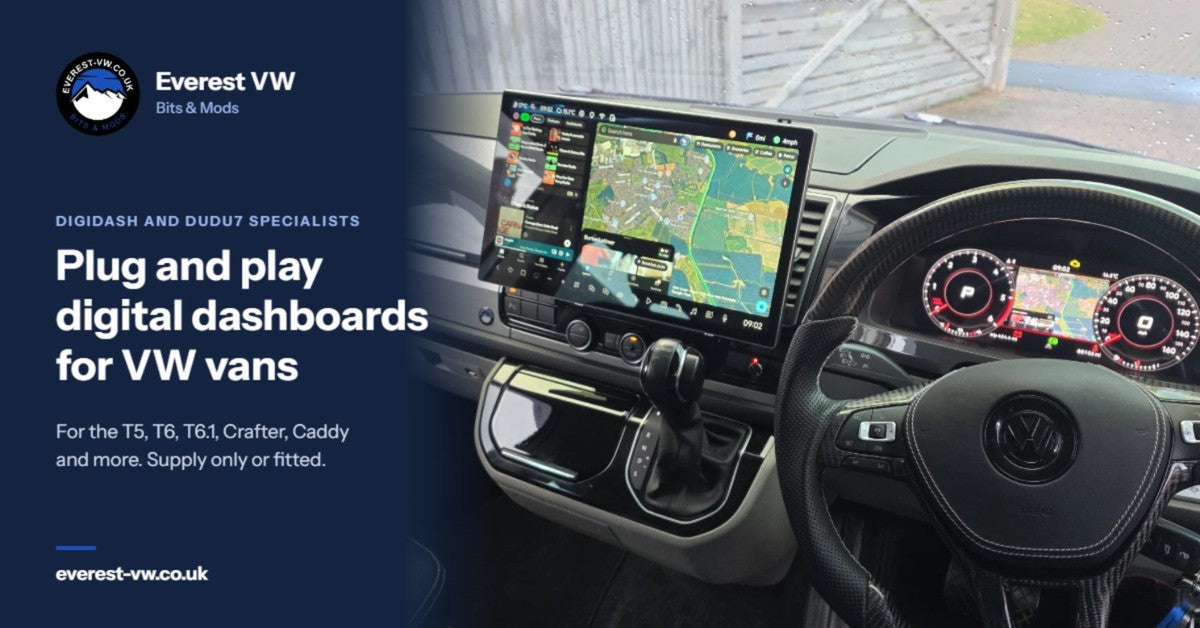
Plug and play DigiDash digital dashboards and DUDU7 head units for VW T5, T6, T6.1, Crafter and Caddy. Supply only, or fitted in St Neots, Welford or at home.
WebsiteCallDirectionsBookContact
The facts
- Address
- Leven House, 27 Isemill Road, Kettering, NN15 5XU Map
- Country
- United Kingdom
- Phone
- +441536697893
- Languages
- English, German, French
- Ships to
- Worldwide (55 countries)
- Returns
- within 30 days Returns page
- Reviews
- Trustpilot · Google
- Trust marks
- Google Reviews, Trustpilot
What they sell
Web shop on Shopify: 82 products, £474.99
 VW Touran (2009-2013) Digital Dashboard Upgrade£474.99–£775.99In stock
 VW Touran (2004-2008) Digital Dashboard Upgrade£474.99–£775.99In stock
 VW Tiguan (2016-2022) Digital Dashboard Upgrade£474.99–£775.99In stock
 VW Tiguan (2004-2008) Digital Dashboard Upgrade£474.99–£775.99In stock
 VW T-Roc (2018-2025) Digital Dashboard Upgrade£474.99–£775.99In stock
 VW Sharan (2012-2019) Digital Dashboard Upgrade£474.99–£775.99In stock
 VW Polo / T-Cross (2019-2025) Digital Dashboard Upgrade£474.99–£775.99In stock
 VW Polo (2010-2016) Digital Dashboard Upgrade£474.99–£775.99In stock
 VW Polo (2001-2009) Digital Dashboard Upgrade£474.99–£775.99In stock
 VW Passat NMS (US model) (2017) Digital Dashboard Upgrade£474.99–£775.99In stock
 VW Passat B8 (2017-2024) Digital Dashboard Upgrade£474.99–£775.99In stock
 VW Passat B7 / CC (2012-2016) Digital Dashboard Upgrade£474.99–£775.99In stock
12 of 82 products, read 2 days ago
12 of 82 products, prices £474.99, as published by the shop (read from the shop 2 days ago; the shop last changed its products 26 November 2026; last change seen here 2 days ago). Prices and stock change; the shop’s website has the current ones.
About
“I love my new modern Digi dash. Far exceeded my expectations.” “I ordered the digidash and Ai box on Friday and Anthony drove 90 miles to install it the following Tuesday!” “Extremely knowledgeable, treats the vehicle as if it was his own.”
Frequently asked questions
What’s in the box?
Your digital dash package includes: A digital dash unit Trim tools and Torx drivers A wiring harness Zip ties Links to Everest-VW fitting videos Links to Everest-VW settings and configuration guides Support contact details Opt for our remote control option and that will be in the box too. Make sure you fit the receiver — without it, the remote won’t receive a signal. Our remote control fitting video explains how to install it.
When will I receive the unit?
All dispatches are accompanied by tracking information shared via email. Delivery times vary from product to product, and delivery is free and tracked, taking 4-8 days. Where popular products are out of stock at Everest-VW HQ and we are replenishing them, stock is on its way, or we will dispatch directly from the factory to avoid a restocking delay. Please remember that we’re a small, family-run business, and sometimes a rush of orders clears our stock faster than we can replenish it. We believe quality support and assurance are worth waiting for. We also receive many requests for help from…
I followed your installation guides, and I’m stuck!
Don’t panic — get in touch via site chat or WhatsApp Business Support on 07841 025 908. We can support you through chat, video, voice messages and pictures — whatever works for you. This is a complimentary service when you buy from Everest-VW. Please be patient: send us a message or give us a call, and we will get to you. You can also book a fitting with us at our workshops in St Neots or Welford, or enquire about a visit to your location for fitting. Supplementary mileage charges apply to visits.
Is there something wrong with my unit?
Let’s talk. Sometimes things go wrong, but that’s what we’re here for. We can often identify what’s happening and help sort it out quickly. If it’s hardware, we can swap parts out and handle the manufacturer warranty process on your behalf. If it’s software, we receive regular customised firmware for our customers and deal with new firmware quirks all the time. Sometimes it’s simply a matter of finding the right settings. When you buy from Everest-VW, you have the peace of mind that our 2-year guarantee accompanies all our units. Our relationship as a development partner with the…
My vehicle is immobilised when I plug in the DigiDash. What should I check?
The plugs may not be seated correctly, or the harness may be damaged. It’s easy to rush the connections when you’re excited to fit the new unit. Our connector fitting video explains what to look for. Contact us for the relevant guide and help checking the installation. Don’t force the plugs or cut or modify the harness. Send clear photos of your connections, your vehicle model and details of the installation stage you’ve reached so we can help.
I want to update my firmware — am I missing out?
If you purchase from Everest-VW, you receive exclusive access to our Google Drive. It includes additional firmware options for your DigiDash, AI connected kit and other products such as the Dudu7, to bring them up to date and get them working just the way you want. We’re always working on new tutorials, videos and guides to help you get the most from your hardware. Before upgrading, consider why you want to update. Is something wrong and you’re hoping for a fix, or do you fancy a new look, such as the Golf 8 theme included in newer firmware? If you’re happy and everything is working perfectly,
My V1 DigiDash shows a blue mirroring screen. Why can’t I update using Wi-Fi?
You may recognise a V1 DigiDash because selecting the Nav menu and pressing down shows a blue screen waiting for a mirror from your mobile. Earlier devices that do not incorporate CarPlay or Android Auto had a screen-mirroring option, unless we have already replaced the screen-mirroring board with an HDMI input. We have done this for customers who wanted to mirror across using our AI kit or Dudu7 head unit. These units are typically unable to access OTA (over-the-air) updates through the Wi-Fi option in the settings menu because the server address stored in the unit is out of date. The…
My unit has started making a “bong” above a specific speed. Is it a speed alert?
This may be a speed warning or winter tyre alert stored in the original vehicle settings. The process differs between vehicle models. T5.1 and T6: why it happens Your original MFD has configurable speed warnings. Many customers have never used them. The OEM board transferred to the DigiDash still connects to the vehicle harness and communicates with the BCM (Body Control Module), so its settings can remain active in the background. As you use the multifunction steering wheel to explore colours and settings on your new DigiDash, button presses can accidentally enable one of these original…
I’ve fitted the unit and run the firmware, but can’t see the UNITS menu.
This can be normal after a firmware update. Exit and lock the vehicle, then wait around 15 minutes before checking again. Our YouTube channel has full tutorials covering setup, configuration and firmware updates, including this issue. If the menu still hasn’t appeared after waiting, contact us for support.
Features
Read from everest-vw.co.uk. Last read 2 days ago. 10 of 11 key facts have a value; missing: opening hours. Where these facts come from