
Virtusx
Software & SaaS in Overland Park · Web shop on Shopify · virtusxus.com
Virtusx makes the Jethro AI Mouse and Phronesis AI Keyboard and the free Virtusx AI App (formerly V-AI): push-to-talk voice typing in any app, instant translation and AI meeting notes on Windows and macOS.
- Country
- United States
- Payment
- Cash
- Languages
- English
- Ships to
- United States
- Shipping information
- Shipping page
- Returns
- within 30 days Returns page
What they sell
Web shop on Shopify: 4 products, $14.95–$156.95
 AI Mechanical Keyboard$156.95In stock
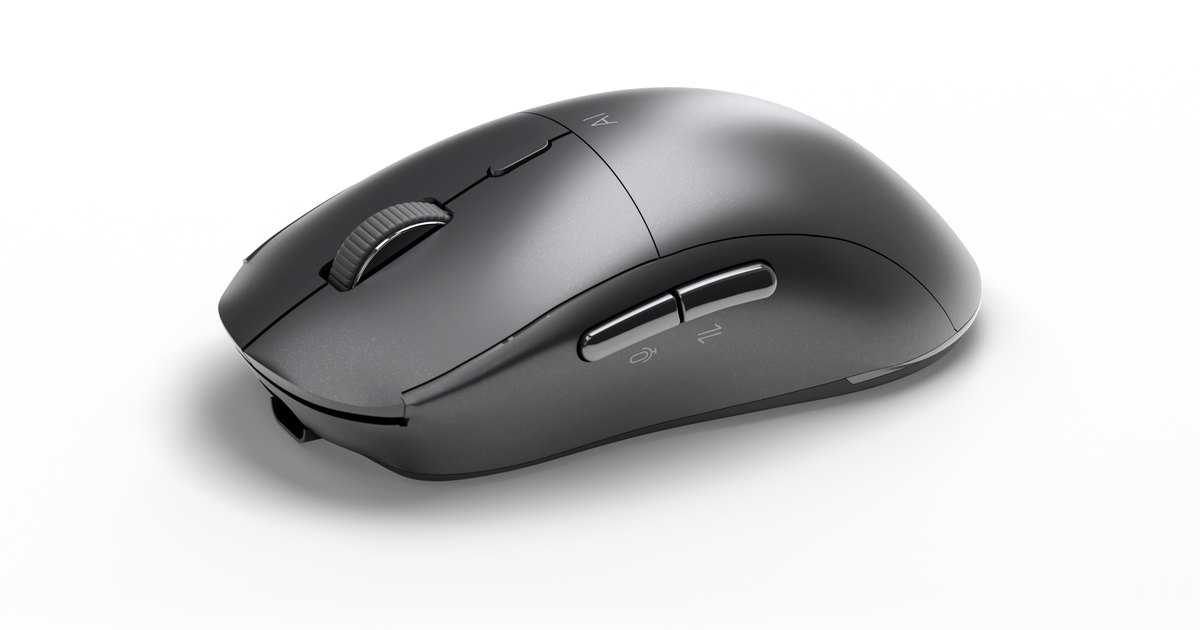
 Jethro V1 AI Mouse$119.95In stock
 Virtusx Gaming Mouse Pad$14.95In stock
 Ergonomic Mouse Rest$23.95In stock
4 products, prices $14.95–$156.95, as published by the shop (read from the shop 18 h ago; the shop last changed its products 22 November 2026; last change seen here 18 h ago). Prices and stock change; the shop’s website has the current ones.
About
Every day is filled with things worth keeping. The words you would normally type. The conversations, ideas, and decisions that happen along the way. Speak instead of type. Press a key to start recording a meeting. Virtusx captures each new input and turns it into a personal memory that stays with you. Hold the mic key and dictate emails, notes and documents in any app, on Windows and Mac.
Services
- Meet Jethro. · The mouse that listens, types, and remembers.
- The software. One app behind every key.
- Tech specs.
Prices
| Virtusx AI App | $0 |
| Jethro V1 AI Mouse | €119.95 |
Prices as shown on the website when it was last read; the business may have changed them since.
Frequently asked questions
Is there a mouse that lets me type with my voice?
Yes. The Virtusx Jethro AI Mouse has a built-in microphone and a dedicated voice button. Put your cursor in any text field, hold the button, speak, and release — your words appear in Word, Gmail, Slack or any other app, in 50+ languages, through the free Virtusx AI App.
Is the Jethro AI Mouse easier than Windows Voice Typing?
Yes. Windows Voice Typing needs Windows + H, a click on the microphone icon, a wait for "Listening…" and another click to stop. With the Jethro AI Mouse you just hold the voice button, speak and release — your hand never leaves the mouse.
Can the Jethro AI Mouse translate as I speak?
Yes. Hold the Translation button to translate your speech in real time, or click it to translate a single word. Translation runs in the free Virtusx AI App on Windows and macOS.
Can I chat with ChatGPT or other AI from the mouse?
Yes. Click the AI button to open AI chat with ChatGPT, Claude, Gemini or Grok, or hold it for AI voice typing — no browser tab or copy-paste needed.
Can the Jethro AI Mouse take notes in my meetings?
Yes. With the Virtusx AI App it records online and in-person meetings, labels each speaker and gives you a one-click AI summary you can share by email or link. It works with any meeting, not one specific app.
Does the Jethro AI Mouse work on Windows and Mac?
Yes. It works with Windows 10 and 11 and macOS 12 or later through the free Virtusx AI App, and connects with its 2.4 GHz USB receiver, Bluetooth or a wired USB-C cable. Voice typing also works offline.
Products
JethroPhronesisSoftwarePricingDownload
Company
BlogShop
Help
Help CenterContactReturns & RefundsTerms & Privacy
How much is shipping?
Shipping is free within the United States. For other countries, it is calculated at checkout.
How do I return a product?
Return it within 30 days of delivery, for any reason. Email support@virtusxus.com with your order number to start. In the US we send you a prepaid return label; from other countries, you pay the return shipping. A $5 restocking fee is taken from your refund. Returns policy.
What does the warranty cover?
Jethro has a one year limited warranty from the date of delivery, against defects in materials and workmanship under normal use. To make a claim, email support@virtusxus.com with your order number.
Is Pro included with my device?
Every Virtusx device comes with 3 months of Pro. After that, Pro is $25 a month unless you cancel. Cancel anytime in the app and keep the free Starter plan. Compare plans.
How do I cancel a plan?
Cancel anytime in the app. Your plan runs to the end of the month you paid for.
Which computers does the app support?
Windows 10 and 11, and macOS 12 or later. Download it for Windows or Mac.
What do the three keys do?
Hold the Mic key and talk, and Jethro types what you say. Hold the Translate key and talk, and your words come out in another language; click it to open the Smart Toolbar. Hold the AI key and ask, and the AI answers; click it to open the Virtusx app.
Does Jethro work without the app?
Yes, as a regular mouse. The Mic key, Translate key and AI key need the Virtusx app.
How does Jethro connect?
Three ways: wireless connection 1, wireless connection 2, or the USB receiver.
Where is the USB receiver?
Under the palm cover. Lift the cover off and the receiver is stored underneath, so it never goes missing.
How long does charging take?
About 3 hours for a full charge, with the cable in the box. Jethro also has a power switch.